 |
Ortery UK, Ireland and Russian Federation Exclusive Partner: 020 8987 2744 |
|
Ortery UK, Ireland and Russian Federation Exclusive Partner: 020 8987 2744 |
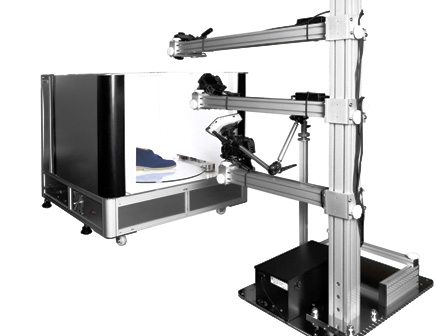
Create 3D models using 360-degree photographs. PhotoModeling 3D800 is a complete solution that automates and simplifies the entire process from image capture to publishing. 360-degree picture taking is synchronised with turntable movement, lamp control and projector On/Off. Captured images are seamlessly passed to our photogrammetry software for 3D model and colorful texture map generation. Results can be immediately exported in common 3D formats or published in the cloud.
Create professional 3D models using the speed of photogrammetry and the accuracy of structured light scanning. PhotoModeling 3D800 maximizes image capture efficiency, reliability and 3D model accuracy. This end-to-end solution makes creating and publishing 3D models fast and simple.
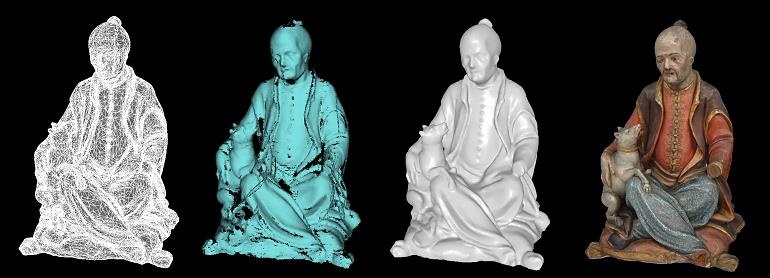
Automatically create 4096 x 4096 (16 megapixels) colorful texture maps using patented photo blending capabilities. Colorful texture maps provide a more realistic object view.
In addition to 3D models, 3D800 can create Professional Stills and Interactive 360 Animations in HTML5 and GIF file formats.
Creates 3D print-ready closed meshes (no holes)
Models can be created from multiple object orientations with typical digitization accuracy of 1:2000 or +/- 0.5mm per meter.
Place an object on the turntable. The software will guide you step-by-step through the process. Depending on the studio used, after entering the basic calibration and image capture parameters the software can automate almost the entire model creation process. Settings can be re-used for increased productivity.
The photogrammetry software creates a high quality triangle mesh model (the solid geometry onto which texture maps will be added). Tools are provided for editing the surface. The geometry can also be edited manually in a 3rd party editor.
Export 3D Models in common formats (Collada, X3D, 3DS, OBJ and STL) for 3D print and editing in other 3D authoring applications.
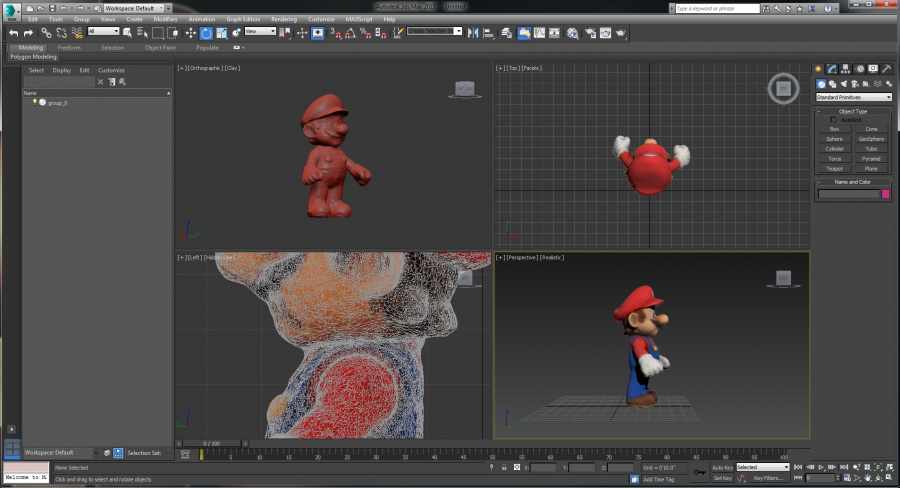
Everything is plugged into the 3D800 so software can integrate light control, camera control, turntable movement and projector on/off to automate image capture, simplify and accelerate 3D model creation.
The 3D800 system controls or eliminates many of the variables associated with creating 3D models. The 'Create 3D Model' button in the software memorizes capture preferences and re-uses workflow parameters to streamline model creation.
Camera viewfinder content is displayed live on your monitor screen so you can adjust and see every detail before taking a single picture. Full camera control via software for Canon dSLR cameras.
Regardless of the Ortery turntable or studio in use, turntable movement and picture taking are synchronized to capture 360 product views of the calibration mat, object and object with structured light.
The 3D800 can be used with a PhotoCapture 360 turntable plus Photosimile 50 / 200 or with a 3D PhotoBench 160 / 260. Each of those solutions comes with its own set of hardware and software benefits that will be available in the combined system.
The 3D PhotoBench Series (160 / 260) features the ability to create pictures and 360 product views on transparent backgrounds. Sophisticated edge detection technology allows the program to automatically knockout backgrounds in real-time.
In addition to 3D models, create professional still and 360 product views in JPG, RAW, PNG, TIFF and HTML5 and GIF, respectively.
Create Professional 3D Models with Colorful Texture Maps Using a Photography-Based System
Integrated Hardware / Software Solution Limits Variables and Accelerates Model Creation
Flexible Two-arm Camera Stand Features Built-in Turntable, Camera, Lighting and Projector Control
Re-Usable Standard Operating Workflow Simplifies and Accelerates Image Capture and Model Creation
Automated Image Capture and Processing
Outputs Standard Formats Compatible with Existing 3D Modeling Packages
Simplified and Advanced 3D Workflows for Professional and Novice Use
Interactive Geometry and Texture Map Editing
Works with Multiple Canon dSLR Cameras
Fast, Precise Wireframe Generation and Surface Optimization Features
Point Cloud Generation with Automatic Registration and Noise Removal
Multiple Scans Can Be Combined
Viewer Support for All Major Browsers; iOS & Droid Apps Available
Create Professional Stills, 360 Product Views (HTML5) and 3D Models with One System
AutoPNG - When Used with 3D PhotoBench Images can be Automatically Captured with Transparent Backgrounds
Automated and Manual Image Masking Capabilities
Subdivision Surface Fitting and Interactive Mesh Decimation
OS: Windows 7 / 8 (latest Service Packs)(Administrator Account for all Windows OS)
CPU: Intel Core™ i3 or better
RAM: 4GB
Internet connection with active email account (optional)
Min 2 USB Ports, CD/DVD ROM drive
PhotoModeling 3D800 – Flexible three-arm camera stand
Pico Image Projector and SD Card with Structured Light Templates
USB cord, Power Cord
2 White Rotation Knobs (M6 x 20)
2 White Rotation Knobs (M8 x 24)
2 Spare Black Hand Screws
2 White Round Product Stands
#12 Allen Key, Registration Sheet and Cable Ties
Operation and Installation Guides
To run on a Mac you will need an Intel based Mac and a copy of Windows to run under OS X Boot Camp, VMware or install Parallels Desktop.
